
Recovery tracking with Apple Watch
See how your heart rate variability and resting heart rate compare with your usual levels. Wellhero uses your Apple Watch data to calculate a recovery score and shows the readings behind it.
Download Wellhero on the App Store
Recovery tracking is available without a Wellhero Pro subscription.
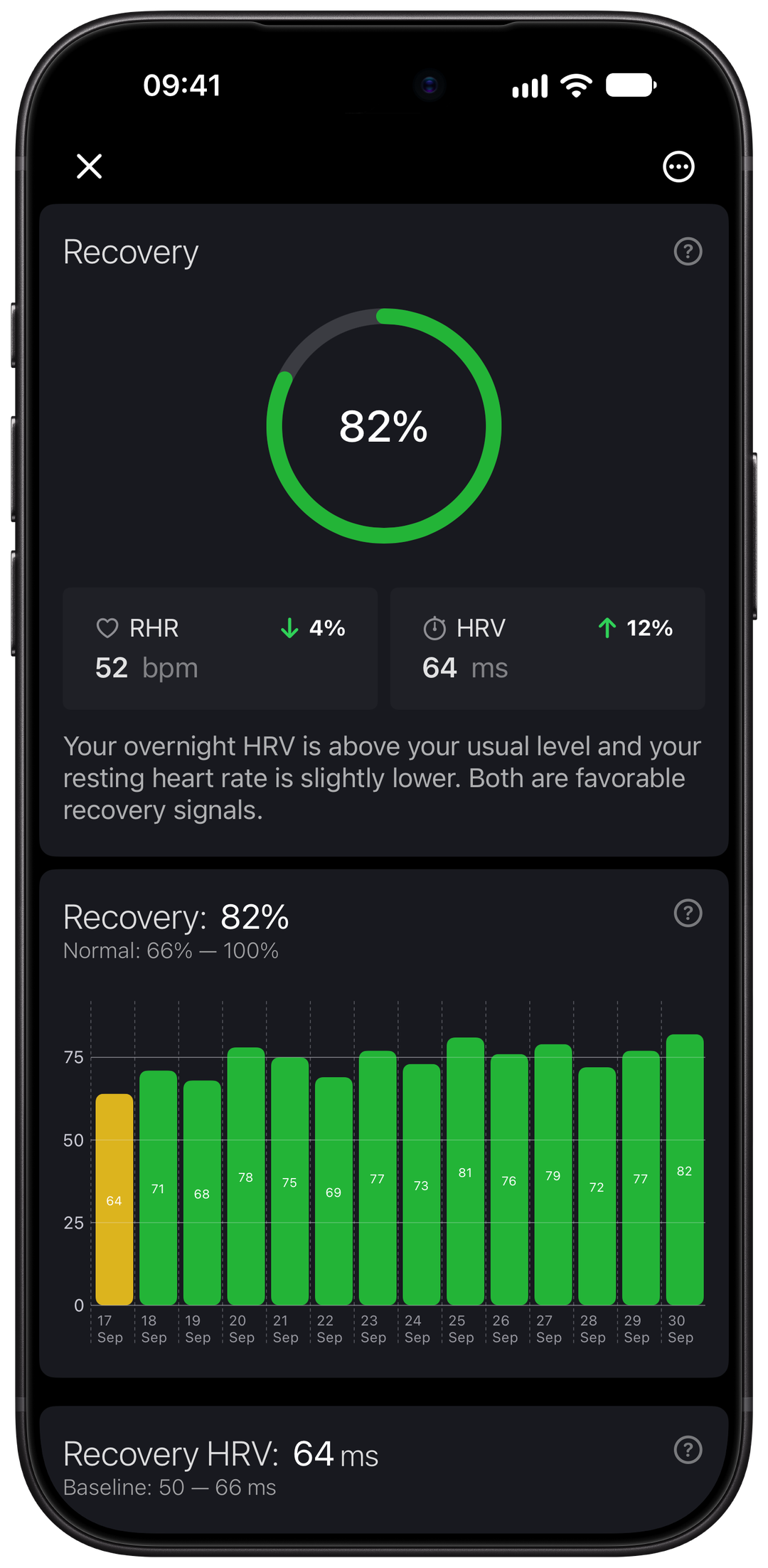
What your recovery score shows
Wellhero gives you a recovery estimate from 0 to 100. The calculation compares the available HRV and resting heart rate data with your personal baseline, built from your previous readings.
Open Recovery to see the score, the measurements used and how they compare with your usual levels. The charts show your recovery history alongside Recovery HRV and resting heart rate.
Read the score alongside how you feel and the changes you see over time. A single reading cannot tell you everything about your readiness for the day.
Which HRV reading does Wellhero use?
Apple Watch can record several HRV readings during the day and while you sleep. Recovery HRV is the value Wellhero selects for that day’s recovery assessment. It currently uses SDNN.
Wellhero checks the available readings in this order:
- A measurement marked as your morning reading.
- Your average HRV during sleep, if there is no morning reading.
- Your average HRV for the day, if neither of those is available.
This means Recovery HRV can differ from the last HRV measurement you took. It can also change when a morning reading or newly synced sleep data becomes available.
Learn how the Apple Watch HRV app uses manual, background and overnight measurements.
Use overnight readings
Wear your Apple Watch while you sleep and allow Wellhero to read the relevant HRV, heart rate and sleep data in Apple Health. After the data syncs, Wellhero can use the HRV readings recorded during that sleep period.
Background measurements depend on what Apple Watch records. A night with missing readings may leave a gap in your overnight HRV. When sleep HRV is unavailable, Wellhero checks the other sources described above.
Explore sleep stages, sleep debt and overnight vital charts in Wellhero.
Set up recovery tracking
- Install Wellhero on the iPhone paired with your Apple Watch.
- Grant the requested Apple Health permissions for the measurements you want to use, including HRV, resting heart rate and sleep.
- Wear your watch regularly and give the recorded data time to sync.
- Open Recovery in Wellhero to see your score and the readings behind it.
If you prefer a morning measurement, you can use a Breathe session in Mindfulness on Apple Watch. Once the measurement appears in Wellhero, mark it as your morning reading. The Apple Watch HRV page explains the measurement workflow.
To inspect the load from a recorded session, explore Wellhero workout analysis, Strain and Training Load. Read it alongside your recovery and recent sleep.
How Recovery relates to daily Strain
Recovery helps put your accumulated daily load in context. Read how Strain and its personal range work, with examples of the same load at different Recovery values.
Questions about recovery tracking
Why is my recovery score missing?
Wellhero needs usable measurements and enough history to establish your personal baseline. If you have just started, continue wearing your watch and allow time for data to accumulate. If you previously had a score, check your Apple Health permissions and whether recent readings have synced.
Does Wellhero need both HRV and resting heart rate?
It uses both when enough data is available. A score can also be calculated from one of these measurements when that measurement has sufficient history for comparison. Missing data can limit what appears in the details.
Does Apple Watch calculate this recovery score?
Wellhero calculates the score from the health data available to the app. Apple Watch supplies the measurements through Apple Health.
Is recovery tracking free?
The Recovery score and its HRV and resting heart rate charts are available without Wellhero Pro. Other app features and access to older history may depend on your plan.
Can the score diagnose a health problem?
Wellhero is a wellness app. Its recovery estimate is not a medical diagnosis or a replacement for professional medical care.
See your recovery in Wellhero
Connect your Apple Watch data to Wellhero and open Recovery to explore your score and history.