
Apple Watch HRV app
Understand the HRV readings your Apple Watch collects. Use Wellhero on iPhone for detailed reports, and check your latest wellbeing stats on your wrist.
Download Wellhero on the App StoreYour latest stats, on your wrist
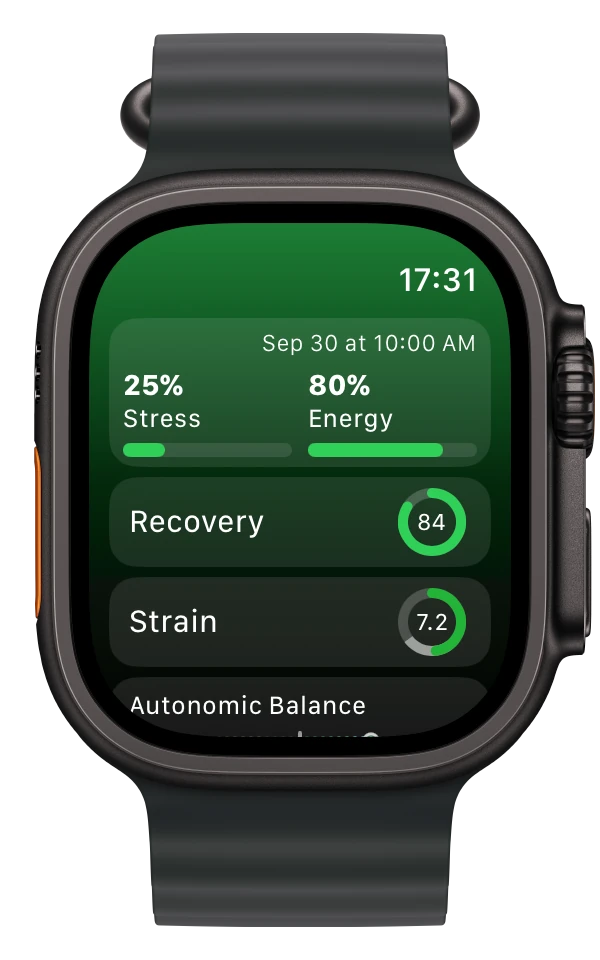
The Wellhero watch app shows your latest stress and energy estimates alongside recovery and other daily stats. Open Wellhero on your iPhone to see the detailed reports behind those numbers.
Learn how the stress monitor app uses your measurements and what the result means.
Take a measurement with Mindfulness
For a measurement you start yourself, open Mindfulness on your Apple Watch and choose Breathe. Wellhero’s instructions recommend a two- to three-minute session: keep still and breathe normally.
After the session, allow time for your watch to sync with your iPhone. Open the Apple Watch measurement screen in Wellhero, refresh if needed, and select the session to analyze. Choose Breathe for this workflow; Reflect is a different type of session.
Use the readings your watch takes automatically
Apple Watch also records HRV in the background. Wellhero imports the available readings through Apple Health, so you don’t have to start a Mindfulness session for every measurement.
Series 12 and Ultra 4 can record HRV as often as every five minutes. Earlier watches have a different cadence, and actual readings can have gaps. See how often Apple Watch measures HRV and how to check your own recording times.
See HRV recorded during sleep
If you wear your Apple Watch to bed and track your sleep, Wellhero can use the HRV readings recorded during that sleep period. Grant the requested HRV and sleep permissions in Apple Health, then allow time for the data to sync.
A night without enough recorded data may leave a gap. Wellhero needs actual readings to show overnight HRV.
Understand Recovery HRV
Recovery HRV is the HRV value Wellhero uses for that day’s recovery assessment. It currently uses SDNN. Wellhero takes the morning measurement when one is available, otherwise the average during sleep, then the day’s average if neither is available.
The recovery assessment compares HRV and resting heart rate with your own baseline. The Recovery HRV chart helps you follow the HRV value used from one day to the next.
See how recovery tracking with Apple Watch works, including setup and what to check when readings are missing.
What about RMSSD from Apple Health?
Apple Health supports native RMSSD data from iOS 27 and watchOS 27. You can allow Wellhero to read these measurements in Apple Health. Wellhero’s Recovery HRV still uses SDNN.
Getting started
Install Wellhero on your paired iPhone and Apple Watch. Allow access to the Apple Health data you want to use, and give your devices time to sync.
You can then start a Mindfulness measurement or use the background readings already available from your watch. Detailed reports are on the iPhone; the watch app gives you a quick view of your latest stats.
Frequently asked questions
Does Wellhero make my watch measure HRV continuously?
No. Apple Watch controls its background measurements. You can start a Breathe session in Mindfulness when you want to take a manual measurement.
Are SDNN and RMSSD interchangeable?
No. They describe heart rate variability differently. Compare the same metric and similar measurement conditions when looking at your history.
How accurate are Apple Watch HRV readings?
Our Apple Watch HRV accuracy guide explains what validation studies found and how measurement conditions affect comparisons.
Is Wellhero a medical diagnostic tool?
Wellhero is a wellness app. Its readings and estimates are not a medical diagnosis or a replacement for professional medical care.
Get Wellhero for your Apple Watch
Download Wellhero on the App StoreHRV app for iPhone · Apple Watch HRV guide · Recovery tracking with Apple Watch