
How Often Does Apple Watch Measure HRV?
By Wellhero · Published
Apple Watch Series 12 and Ultra 4 can measure heart rate variability as often as every five minutes. If you are seeing closely spaced HRV readings on a new watch, that matches the capability Apple introduced in September 2026.
The answer depends on the model. Older watches use a different sampling approach, and even the new models can leave gaps between recordings. Apple describes the change in its 2026 health and fitness announcement.
HRV frequency by Apple Watch model
| Watch | What to expect |
|---|---|
| Series 12 | HRV readings as often as every five minutes, using the new Health Sensing System. |
| Ultra 4 | HRV readings as often as every five minutes, during the day and at night. |
| Earlier models | Background readings with a cadence that depends on the watch, settings and recording conditions. The five-minute claim for the new sensing system should not be applied to these models. |
Apple's specifications for Series 12 and Ultra 4 describe HRV sampling as 24 times more frequent than on Series 11 and Ultra 3, respectively. That comparison describes the newer hardware's capability; it does not predict the number of records you will find on any particular day.
Does it really measure HRV every five minutes?
It can on Series 12 and Ultra 4. The qualification is “as often as.” Apple says HRV is sampled while you are still, and the number of measurements varies with activity. A day spent at a desk and a day spent moving may produce different amounts of data. See Apple's explanation of HRV sampling.
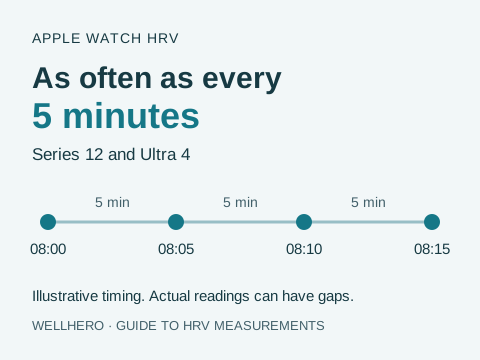
Five-minute spacing also says nothing about the duration of each recording. Four readings at 8:00, 8:05, 8:10 and 8:15 are separate observations. They do not establish that HRV was recorded continuously throughout those fifteen minutes.
Five minutes for HRV, five seconds for heart rate
These are two different claims in Apple's Series 12 specifications. Background heart rate can be recorded every five seconds; HRV can be measured every five minutes. A dense heart rate graph does not, by itself, show how often HRV was recorded. Open the HRV metric to check.
Why older guides say only a few readings a day
Apple documented a slower approach in its November 2024 technical report. The default background tachogram cadence was every four hours. The report described two-hour intervals with irregular rhythm notifications enabled and fifteen-minute intervals with AFib History.
A tachogram is the sequence of beat intervals used to calculate HRV. In that report, Apple said a measurement required the wearer to remain still enough, so an attempted recording did not guarantee a saved result. These are historical sampling rules, not one timetable for every Apple Watch in 2026.
If you have an earlier model, use your own Health records to establish its actual frequency. A watchOS update alone should not be taken as evidence that your watch has acquired the Series 12 or Ultra 4 sensing system.
AFib History is intended for people aged 22 or older with a physician's diagnosis of atrial fibrillation. It should not be enabled simply to obtain more HRV readings. Apple lists the eligibility requirements here.
How often does Apple Watch measure HRV during sleep?
On the new models, frequent sampling extends into the night. Apple explicitly describes Ultra 4's five-minute HRV capability as covering both day and night. Wearing the watch to bed gives it an opportunity to collect overnight readings, although that still does not promise a record for every five-minute interval.
Apple's 2026 update also introduces Recovery HRV alongside overall HRV. Recovery HRV appears among overnight vitals, where it can be compared with your usual range. The announcement explains the two HRV measures.
On Series 12 and Ultra 4, open the Heart Rate app and turn the Digital Crown to see Recovery HRV. These are Apple's instructions for the watch.
Wellhero also uses the name Recovery HRV for the value in its daily recovery assessment. In Wellhero, that value currently uses SDNN: a morning reading when available, otherwise the sleep average, then the day's average. The names do not make the two calculations interchangeable. Our recovery tracking guide explains how Wellhero selects its value.
How to check your actual HRV measurement times
The individual records are more useful for this question than the daily average shown in a chart.
- Open Health on your iPhone and find Heart Rate Variability. You can search for it or open Browse, then Heart.
- Open the metric, scroll to Options and tap Show All Data.
- Choose a day, then open individual records to inspect their times and source.
- Use Data Sources & Access to check which watches and apps contribute to that metric.
Apple's Health data guide explains the data list and source controls. Labels and navigation can vary with the iOS version. If you also have Recovery HRV, inspect that metric separately instead of adding its records to the ordinary HRV count.
Compare neighboring timestamps from the same watch and metric. For example, 9:00, 9:05 and 9:10 show five-minute spacing in that part of the day. They do not tell you the spacing for the rest of the day. A value written by another app should not be counted as an automatic Apple Watch measurement.
Why are there gaps in my HRV data?
Start with the time of the gap. Was the watch charging, loose on your wrist, or worn during a busy period? Apple says stillness affects HRV sampling. Fit and sensor contact also matter: Apple's measurement guidance describes how movement, cold skin and some tattoos can affect the optical sensor.
Check Settings → Battery → Low Power Mode on the watch. Apple says this mode turns off background heart rate measurements, including during sleep. It is a relevant setting to check when background data becomes sparse. See which features Low Power Mode changes.
If a reading appears in Health but is missing from Wellhero, check the app's Health permissions and allow time for syncing. That is a different problem from the watch never recording the sample. Our Apple Watch setup guide covers permissions and importing measurements.
More frequent sampling does not remove the need to consider signal quality and measurement conditions. See the Apple Watch HRV accuracy guide for the evidence on interpreting those readings.
Can I start an HRV measurement myself?
For Wellhero's manual measurement workflow, open Mindfulness on your watch and choose Breathe. Use a two- to three-minute session, keep still and breathe normally. Apple's guide shows where to start a Breathe session and set its duration.
After the session, let the watch sync with your iPhone. In Wellhero, open the Apple Watch measurement screen and select the session to analyze. The step-by-step workflow uses Breathe; Reflect is a different session type.
This lets you choose a time for a planned reading without changing the background sampling schedule. For comparisons, keep your posture, duration and breathing routine consistent. A deliberate slow-breathing exercise has a different measurement context from an ordinary resting check.
Following your readings in Wellhero
Wellhero imports the Apple Watch HRV readings available through Apple Health. You can review your measurements on the iPhone and see your latest stats in the watch app. Background readings and planned Mindfulness sessions give you different ways to follow your own history.
Apple Watch controls the automatic recording schedule. Installing Wellhero does not make an older watch sample every five minutes. Start with the data your watch actually records, then compare the same metric under similar conditions.
Learn about the Wellhero Apple Watch app or how those readings contribute to recovery tracking.
Download Wellhero on the App Store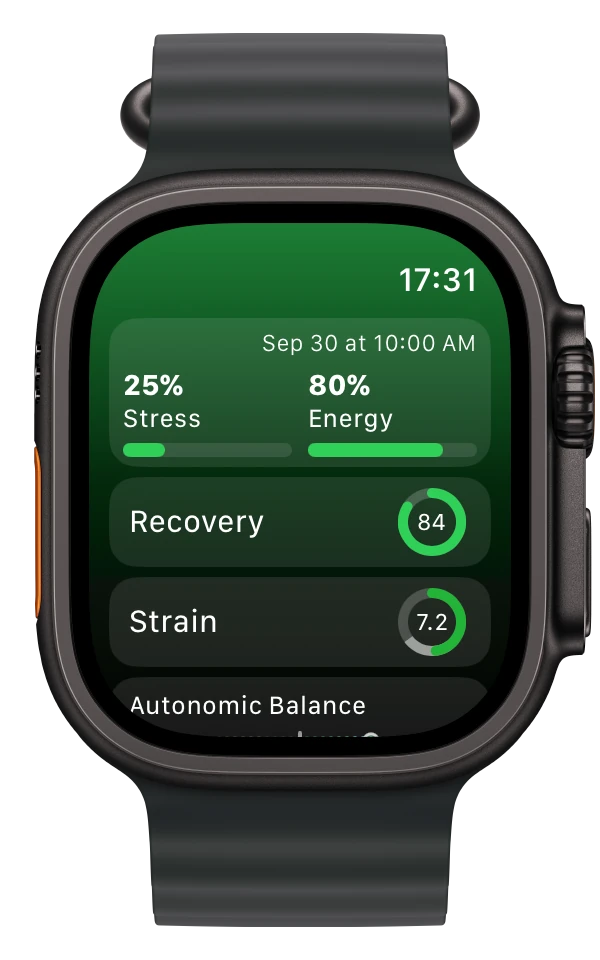
Sources
- Apple's September 2026 health and fitness announcement
- Apple's product specifications: Series 12 and Ultra 4
- Monitor your heart rate with Apple Watch, including Recovery HRV sampling
- Apple's November 2024 technical report, for the historical sampling rules