
Stress monitor app for iPhone & Apple Watch
Check your stress estimate with an HRV measurement. Use your iPhone camera or Apple Watch, then open Wellhero to see your result and the readings behind it.
Download Wellhero on the App StoreStress estimates based on HRV
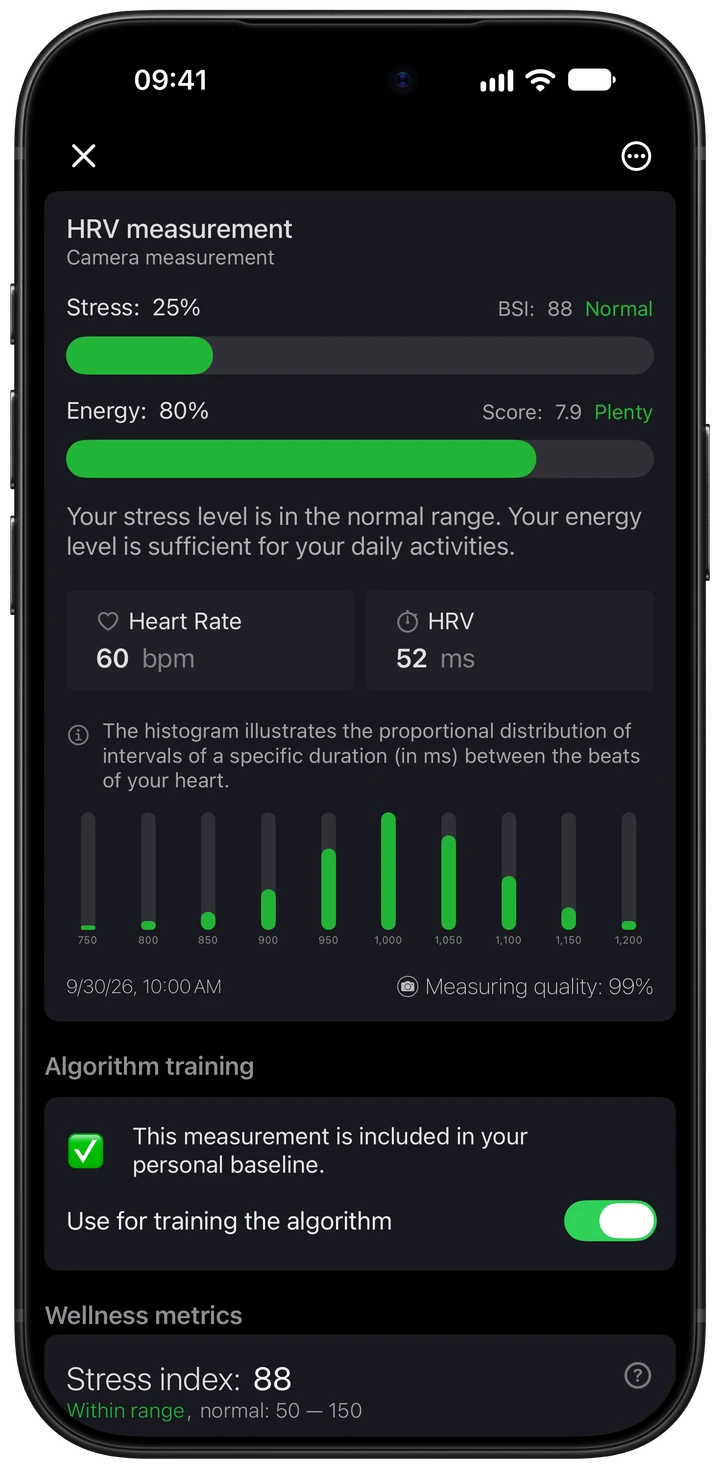
Wellhero analyzes the timing between heartbeats to calculate the Baevsky Stress Index (BSI). Your report shows the index and a stress percentage, alongside heart rate, HRV and an energy estimate.
Check stress on your Apple Watch
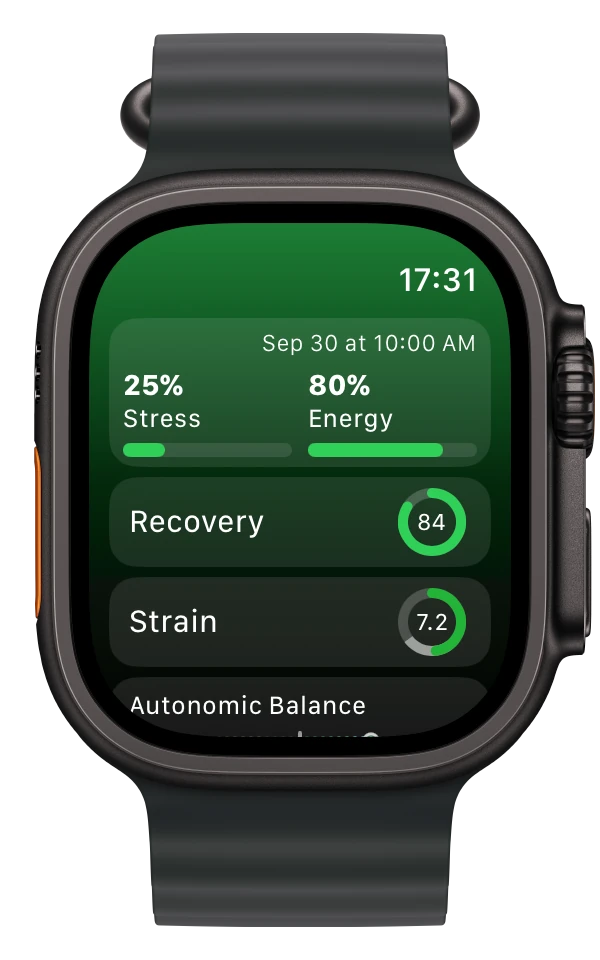
The Wellhero watch app shows your latest stress and energy estimates with the measurement time. You can check a result on your wrist and open the iPhone app for the detailed report.
Take a measurement with Mindfulness
Open Mindfulness on Apple Watch and choose Breathe. Follow Wellhero’s measurement instructions, keep still and breathe normally. After the session syncs, select it in Wellhero on your iPhone to analyze it.
Use your iPhone camera
You can take an HRV measurement without a watch. Wellhero uses the camera and flash to record changes in the light passing through your fingertip.
- Start a camera measurement in Wellhero.
- Place your finger as shown in the app and keep it still while the measurement runs.
- Open the report to review your stress estimate and measurement quality.
If the signal is poor, adjust your finger and follow the on-screen guidance. The iPhone camera measurement guide shows the process and explains the signal graph.
What happens between measurements?
Apple Watch also records HRV in the background. Wellhero imports the available data through Apple Health. What appears in a report depends on the data recorded: a detailed stress calculation needs usable heartbeat intervals.
Background readings do not arrive on a fixed schedule. The watch display shows the latest available result, so check its timestamp when you want to know how recent it is. Allow time for your watch and iPhone to sync after a new measurement.
Read your stress report
Looking for cortisol levels? Apple Watch does not measure cortisol. Read what Apple Watch can tell you about cortisol and stress.
The BSI value and stress percentage use different scales. In the example shown above, a BSI of 88 appears as 25% on Wellhero’s stress scale. The percentage describes that measurement; it does not represent the proportion of your day spent feeling stressed.
Open the Stress index chart to compare the result with previous measurements. Check the measurement quality and use a consistent routine when comparing readings.
You can also review your daily recovery. Recovery uses HRV and resting heart rate against your personal baseline, while the stress report describes an individual measurement.
Frequently asked questions
Does this measure emotional stress?
Wellhero estimates physiological stress from heart rhythm data. Your feelings and the circumstances around a measurement add context that the number alone cannot provide. The app cannot diagnose anxiety or another health condition.
Does Apple Watch calculate the stress score?
Wellhero calculates its stress estimate from the available measurement data. Apple Watch supplies heart data through Apple Health and displays the result in the Wellhero watch app.
Does Wellhero monitor stress continuously?
No. Results come from individual measurements. You can start your own measurement or use supported background readings from Apple Watch when they become available.
Do I need Wellhero Pro?
The iPhone screenshot shows a report opened with Pro. Some detailed HRV analysis and access to older history require a subscription. Check the options in the app for the features included in each plan.
Can I use the result for medical decisions?
Wellhero is a wellness app. Its stress and energy estimates are not a medical diagnosis or a replacement for professional medical care.
Take your first measurement
Use your iPhone camera or a supported Apple Watch measurement to see your stress estimate in Wellhero.
Download Wellhero on the App Store