
Apple Watch sleep tracking and analysis
See how long you slept, how your night was structured and what your overnight readings look like. Wellhero turns sleep data from Apple Health into a detailed report on your iPhone.
Start with your sleep quality, duration and restorative sleep summary. Open the report to explore sleep stages, recent nights, your schedule, sleep debt and five overnight vital signs.
All screenshots below show the app with demonstration data. Pro features are shown unlocked; available measurements depend on your watch and Apple Health data.
Download Wellhero on the App Store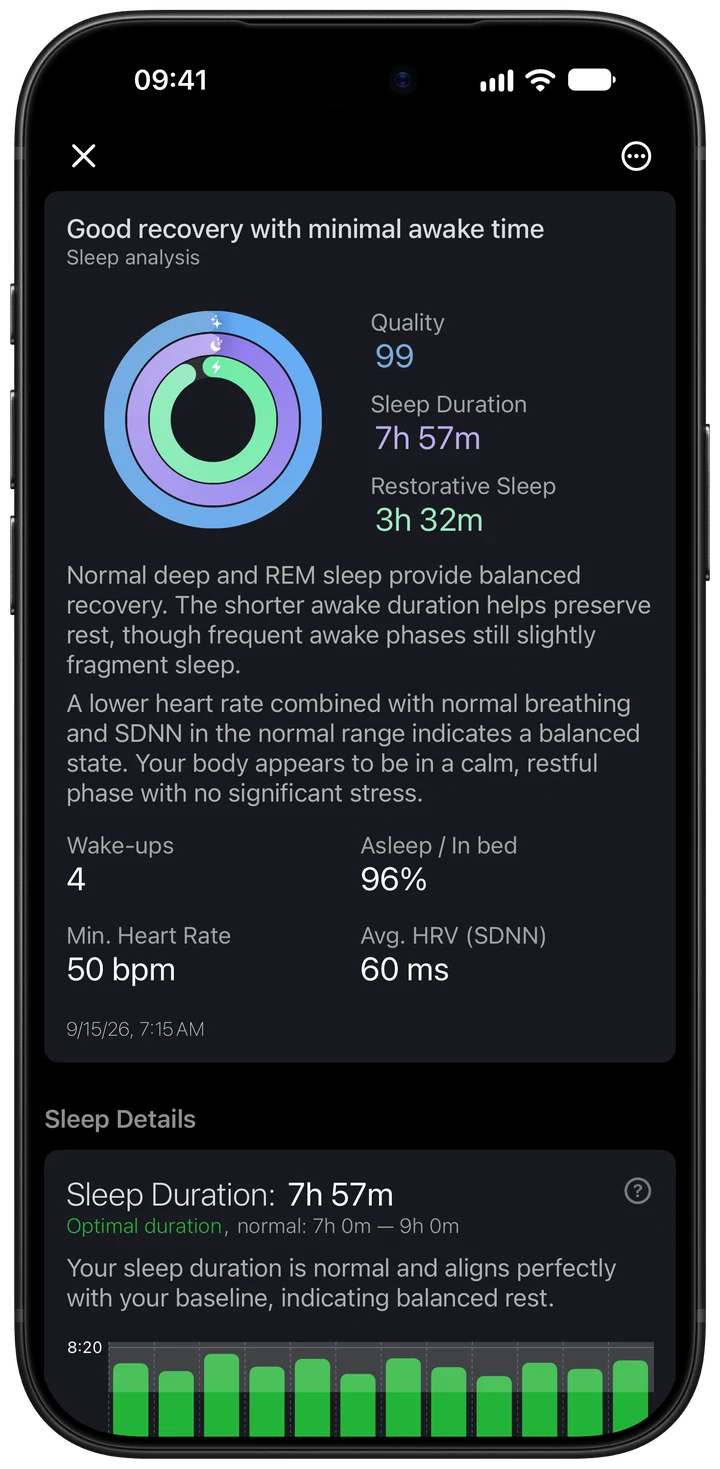
How to use Wellhero for sleep analysis
- Connect Apple Health. Install Wellhero on the iPhone paired with your Apple Watch. Allow the requested sleep and health-data permissions for the measurements you want to see.
- Record a night. Set up sleep tracking on your watch and wear it while you sleep. Check that Apple Health contains the night's sleep record, including stages when your device supplies them.
- Open your sleep report. After your watch syncs with your iPhone, open Wellhero and tap the sleep card in your feed. Read the summary first, then scroll through the detailed charts.
- Check the sleep debt target. Wellhero uses a daily target of 7.5 hours by default. The sleep debt help screen explains how to request a different target through support.
- Compare several nights. Use the dates in the history charts and switch between the overnight vital tabs. Look for repeated changes in your own readings before drawing a conclusion from one night.
If a night is missing, check Apple Health first. In your Wellhero profile, open Apple Health Data, choose Health Status, then select Sleep to inspect its sync status. A missing measurement is a gap in the report, rather than a zero reading.
Jump to sleep quality, stages, schedule, sleep debt or overnight vitals.
What the sleep quality score means
Sleep quality is Wellhero's summary score on a scale of up to 100. It combines recorded sleep duration, REM and deep sleep proportions, awake time, wake-ups and heart rate. Duration contributes the largest part of the score.
Use the score as a starting point. Two nights can receive a similar score for different reasons: one may be shorter, while another has more interruptions. The detailed report shows which measurements sit behind the result.
The three summary rings answer separate questions. Quality shows the overall score. Duration shows time asleep, with an eight-hour reference for the ring. Restorative sleep shows REM and deep sleep combined, with its own stage-based ring. Sleep debt uses a separate daily target, described below.
The summary also lists wake-ups, an “Asleep / In bed” indicator, minimum heart rate and average HRV. Read these alongside the stage timeline. The sleep quality score and your recovery assessment are separate results.
Sleep duration: time asleep and recent history
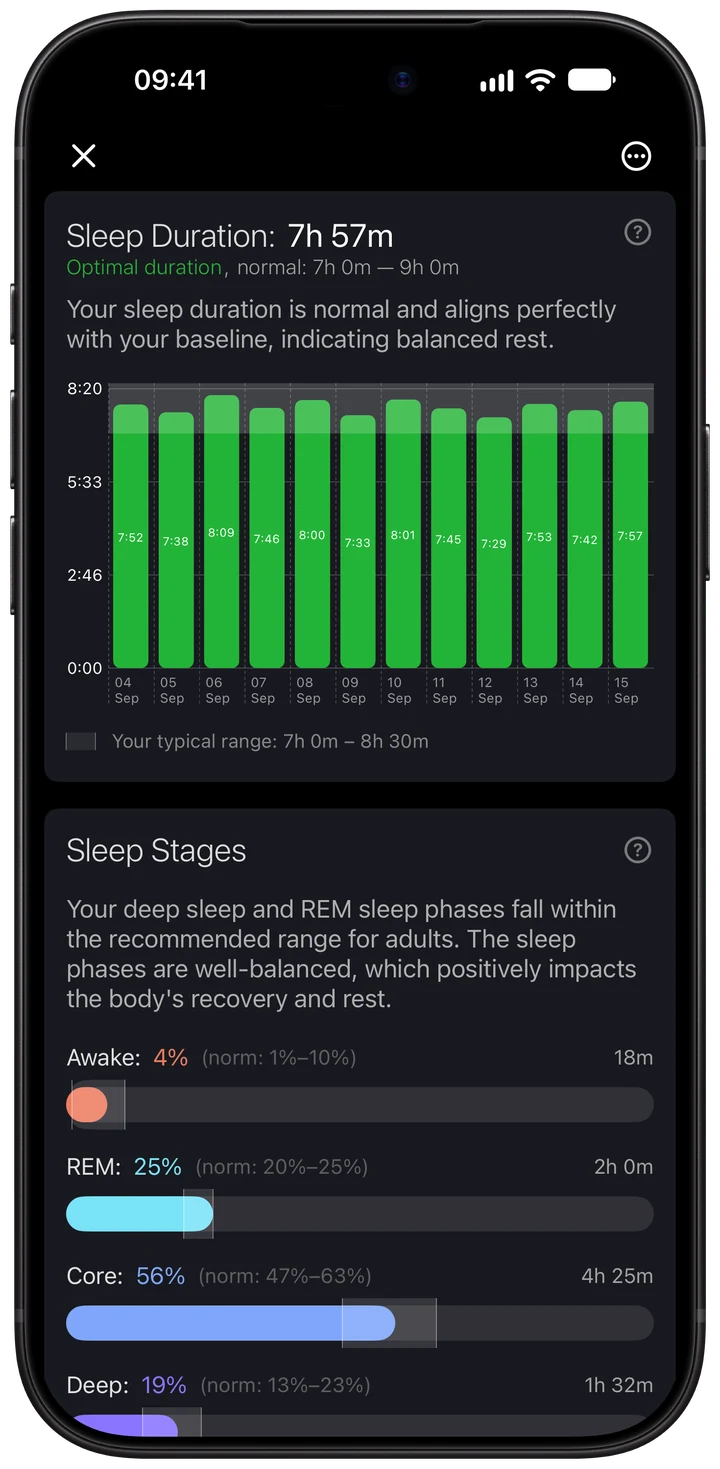
Sleep duration is the time recorded as asleep. Awake periods are shown separately, so the night's start-to-end span can be longer than the duration in the summary.
The duration chart compares recent sleep records in hours. Select a date to see its value. This makes it easier to spot a run of shorter nights or see whether your sleep duration stays fairly consistent.
For example, the demonstration night contains 7 hours 57 minutes asleep. Its recorded wake time does not count toward that total. Compare the hours with your own sleep goal, then check the stage timeline for interruptions.
Sleep stages: Awake, REM, Core and Deep
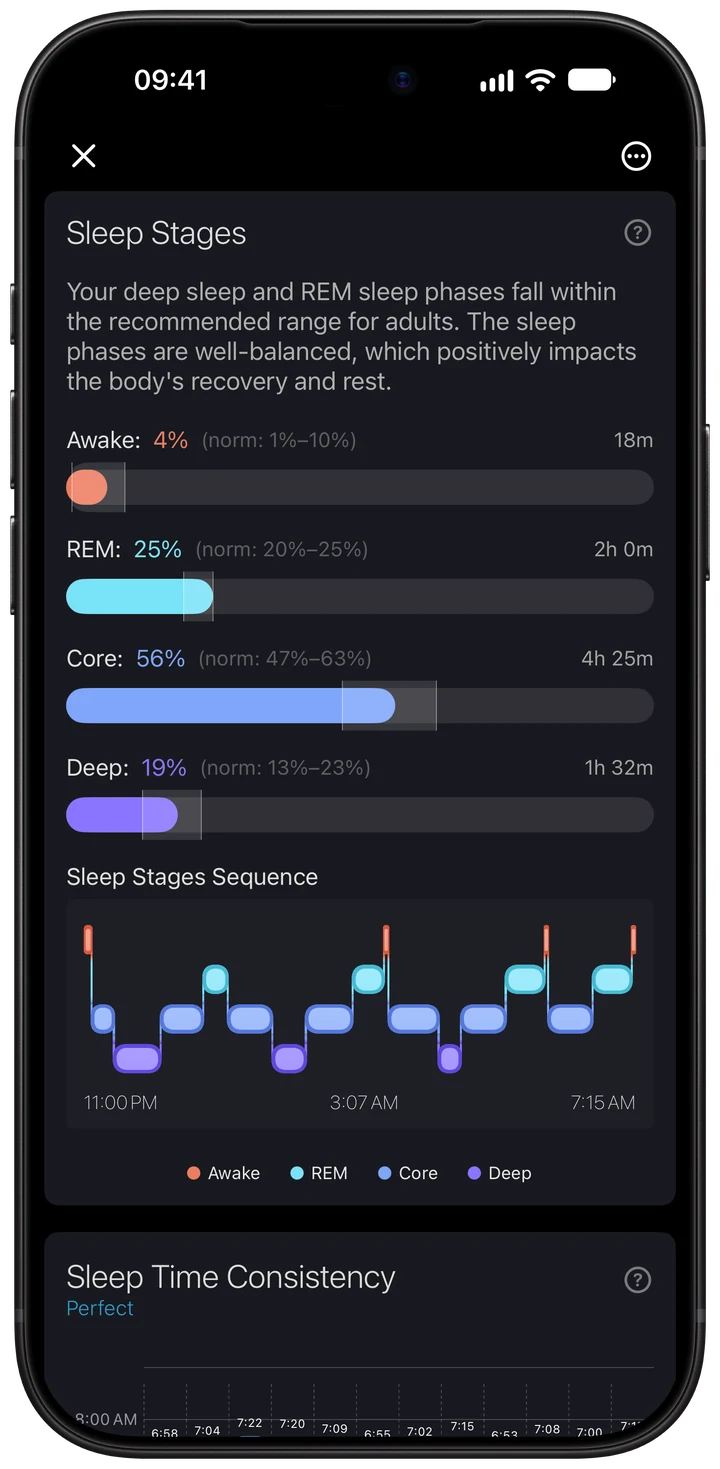
The stage timeline shows when Apple Health recorded each part of the night. Wellhero displays the duration of REM, Core and Deep sleep, plus recorded Awake periods.
REM, Core and Deep percentages describe their share of time asleep. Awake time is a separate value. Follow the timeline to see how the stages changed during the night and where interruptions occurred.
Tap the stage help control in the report for explanations. If the source contains sleep without a known stage, the report can show that separately. Missing stage detail does not mean that you had no REM or deep sleep.
Use this chart to understand the recorded night. Watch-derived stages are estimates; the report is not a clinical sleep study.
Sleep schedule: when your nights begin and end
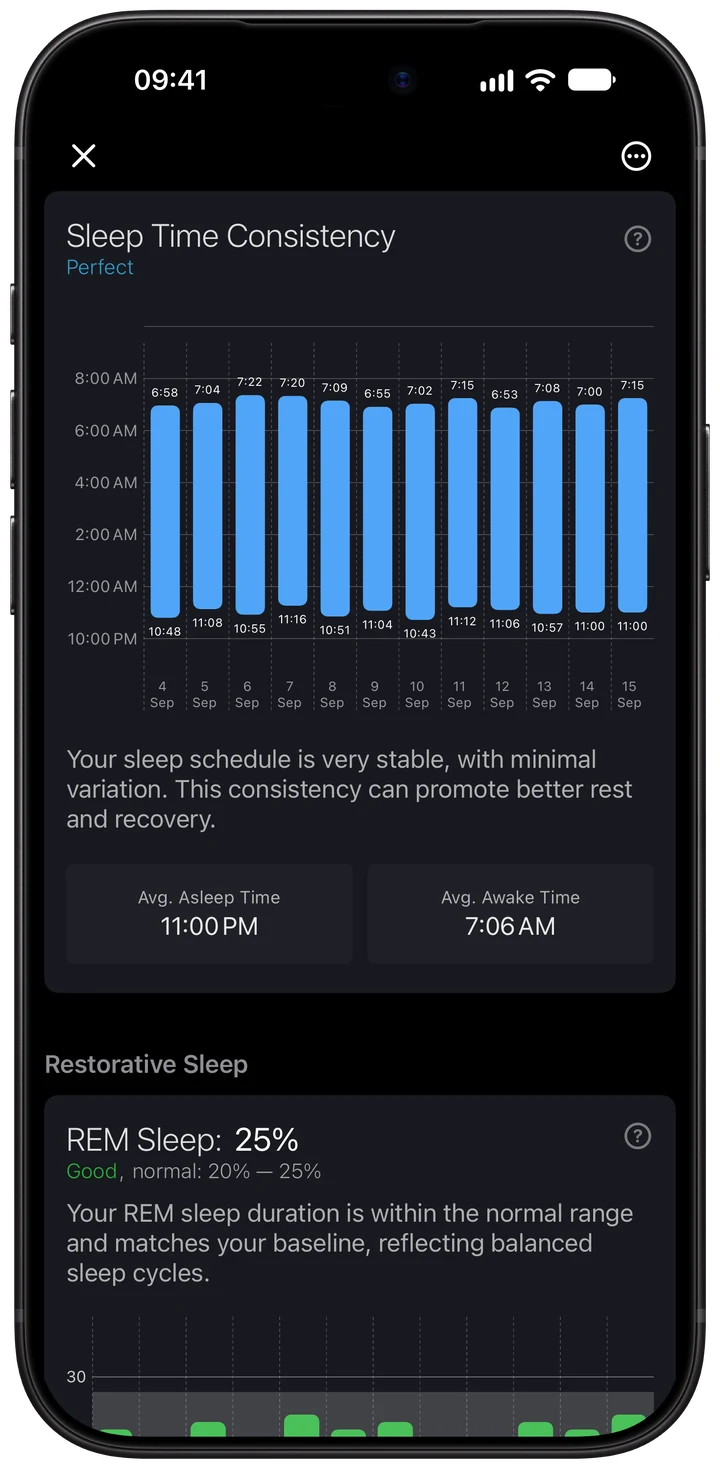
The schedule chart places recent nights on a clock-time axis. Each bar connects the recorded start and end of that night's sleep, making shifts in bedtime and wake-up time visible.
Average times give you a reference for the period shown. The consistency description helps you see how much your bedtime varies. Select a date to inspect a particular night rather than relying only on the average.
A stable duration can hide a changing schedule. For example, two eight-hour nights may begin at very different times. Read the schedule and duration charts together to see both parts of your routine.
Restorative sleep: REM and deep sleep in detail
Wellhero's restorative sleep duration adds recorded REM and deep sleep. The summary gives you the combined time; the detailed report separates the two stages so you can see which one changed.
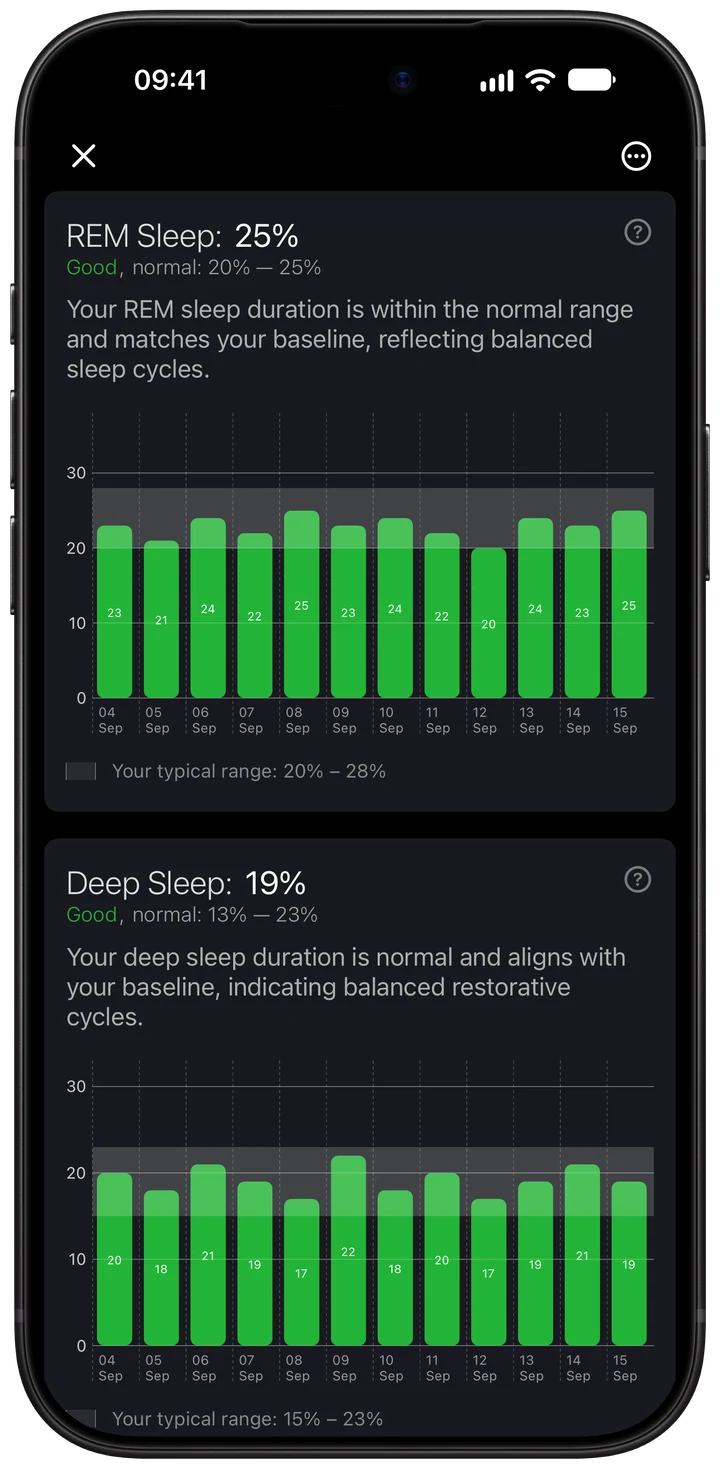
REM sleep percentage shows REM as a share of time asleep. Deep sleep percentage does the same for deep sleep. Their history charts let you compare the selected night with other recorded nights.
Read the percentages alongside the hours. A shorter night can have a similar stage percentage while containing less actual time in that stage. In the demonstration report, 2 hours of REM and 1 hour 32 minutes of deep sleep make 3 hours 32 minutes of restorative sleep.
The chart's reference ranges help explain the app's presentation. Use your own recent pattern as additional context; one stage percentage does not establish how recovered you are.
Sleep debt: your recorded sleep compared with your goal
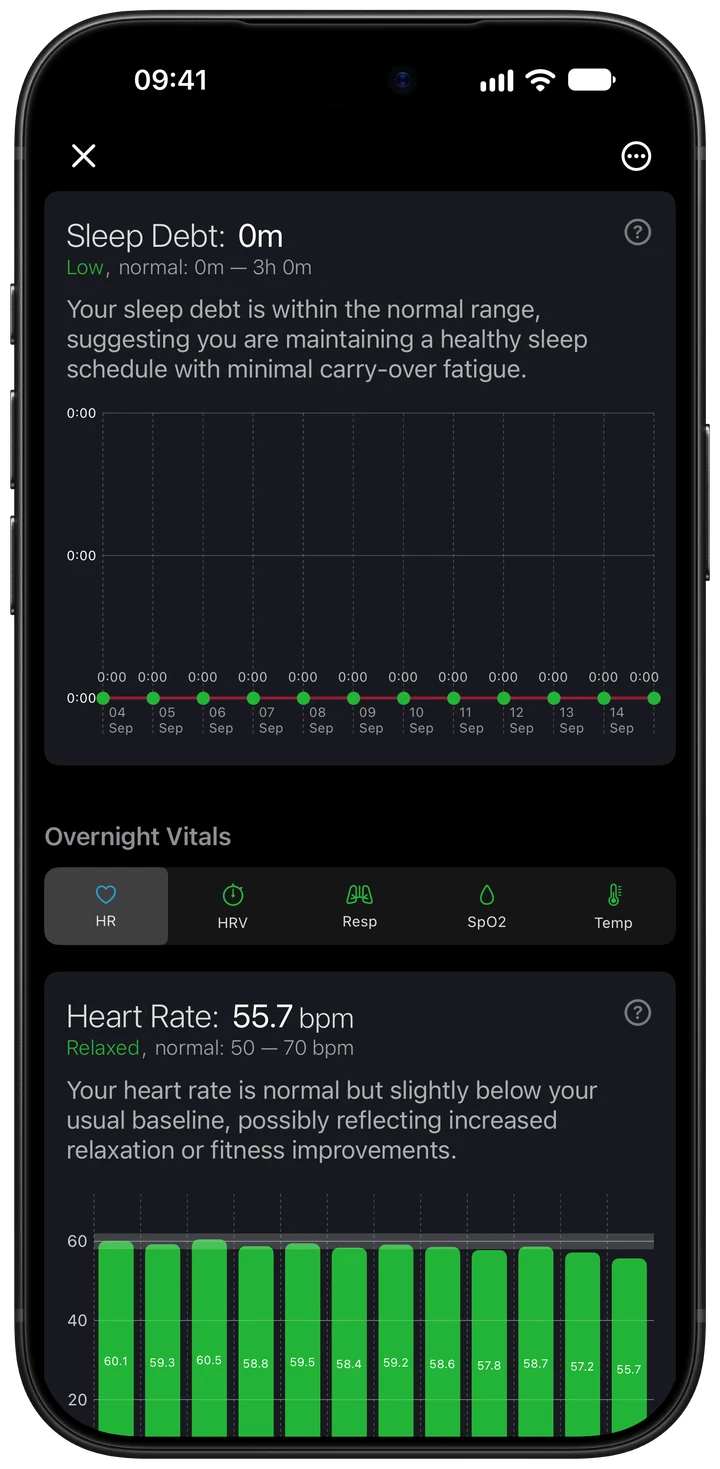
Sleep debt estimates the accumulated shortfall against a daily sleep target of 7.5 hours by default. A recorded day below the target adds to the estimate. Sleep above the target reduces it, with the balance stopping at zero.
The calculation uses recent recorded sleep, including recorded naps attributed to the same day. The target affects what counts as a shortfall. If you need a different value, the app's sleep debt help directs you to [email protected] to request a change.
Missing days are not treated as nights with zero sleep. They still make the picture incomplete, so the displayed balance is an estimate for the available recent records, rather than your lifetime sleep deficit.
Use it to spot repeated short nights. It does not prescribe an exact number of extra hours or guarantee that one longer night reverses the effects of several shorter ones.
Overnight heart rate
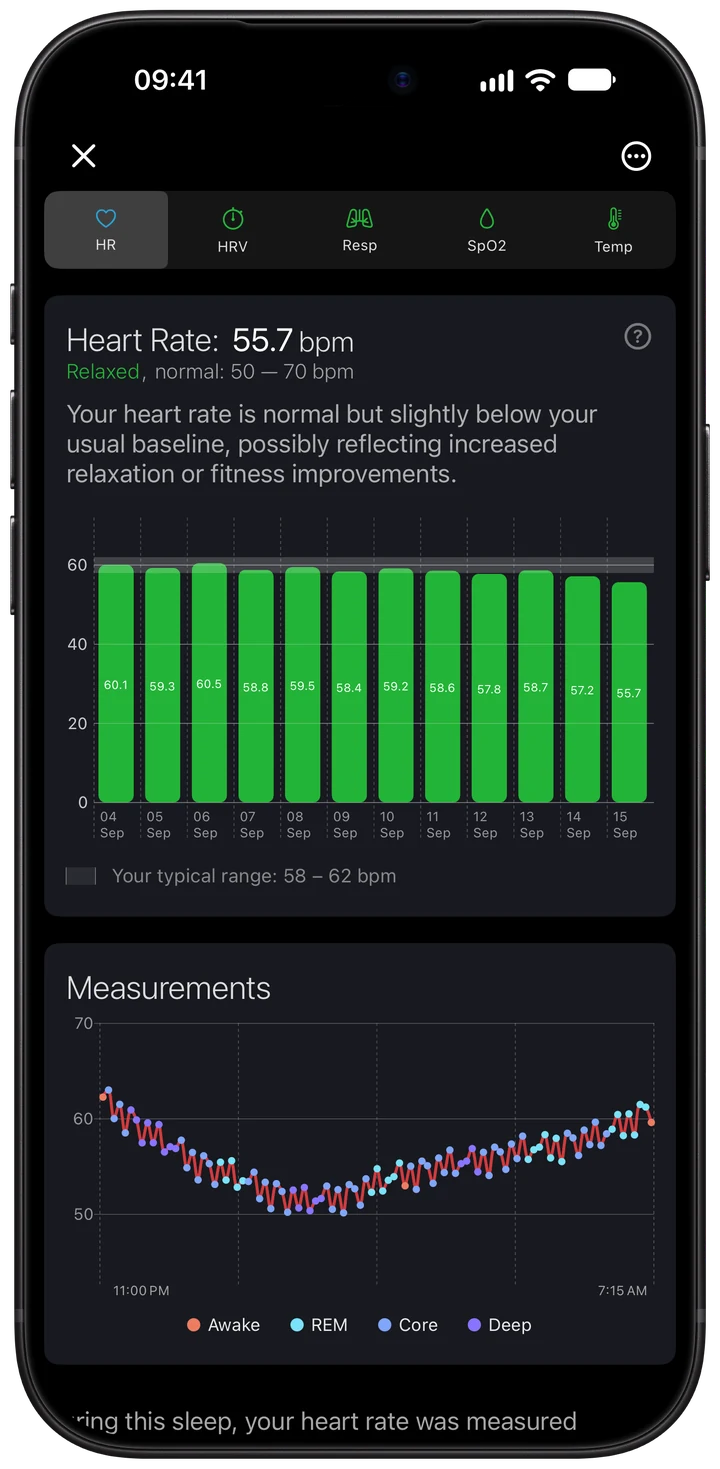
The heart rate tab shows your average heart rate during the recorded sleep period in beats per minute (bpm), its recent history and the readings across that night.
The summary's minimum heart rate is a different value from the tab's nightly average. A low point on the chart and an average across the whole night should not be compared as if they were the same measurement.
Look at the timing of changes alongside the sleep stages. The colored points identify the stage associated with a reading. The history chart helps you compare the nightly average with your recent pattern.
Overnight HRV
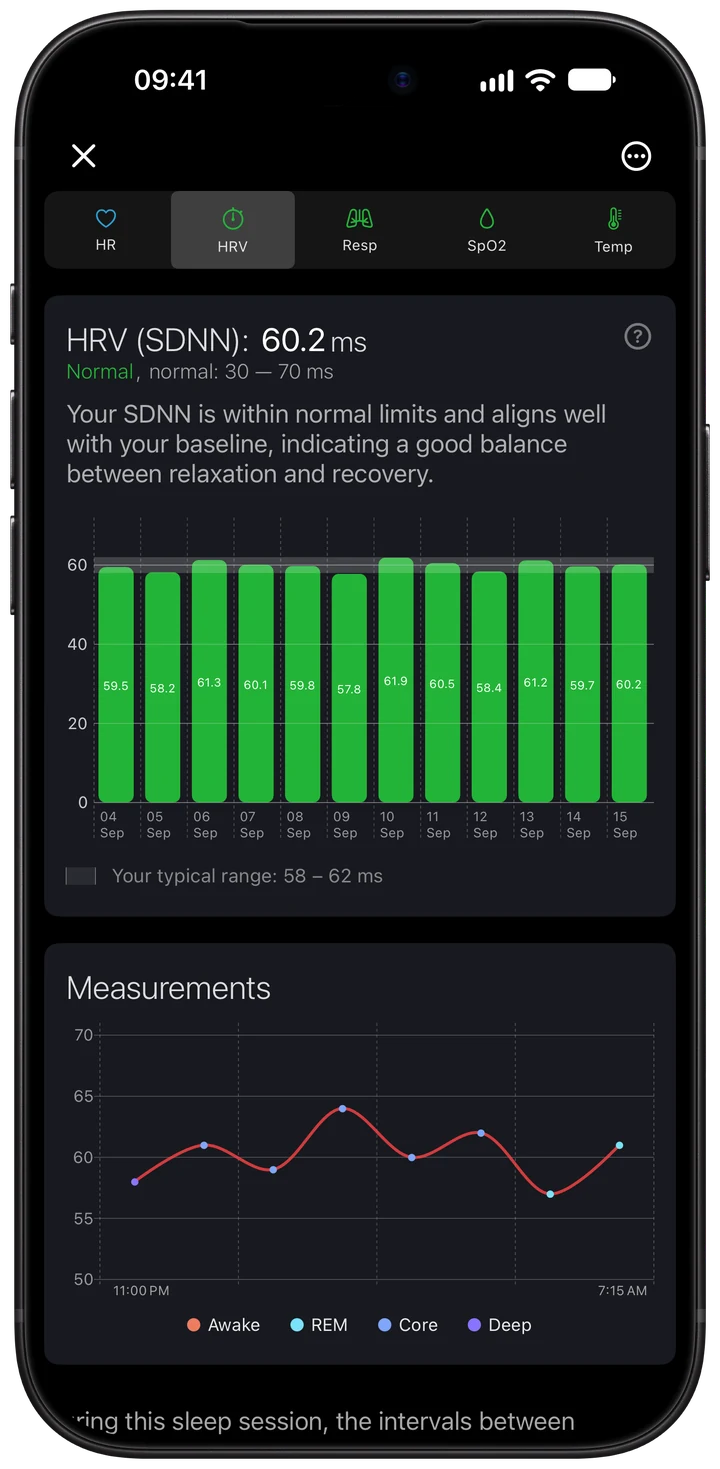
The HRV tab uses the SDNN readings available from Apple Health, in milliseconds (ms). It shows their average during the sleep period, recent nightly averages and the individual readings that were recorded.
Apple Watch HRV is sampled at intervals. A handful of points is not a continuous recording of the entire night. The number and timing of available readings affect how much of the night the chart represents.
Compare SDNN with SDNN measured in similar conditions. An app using RMSSD, another recording length or a different averaging method can show a different HRV number. Read more about the sources in the Apple Watch HRV app guide.
Respiratory rate
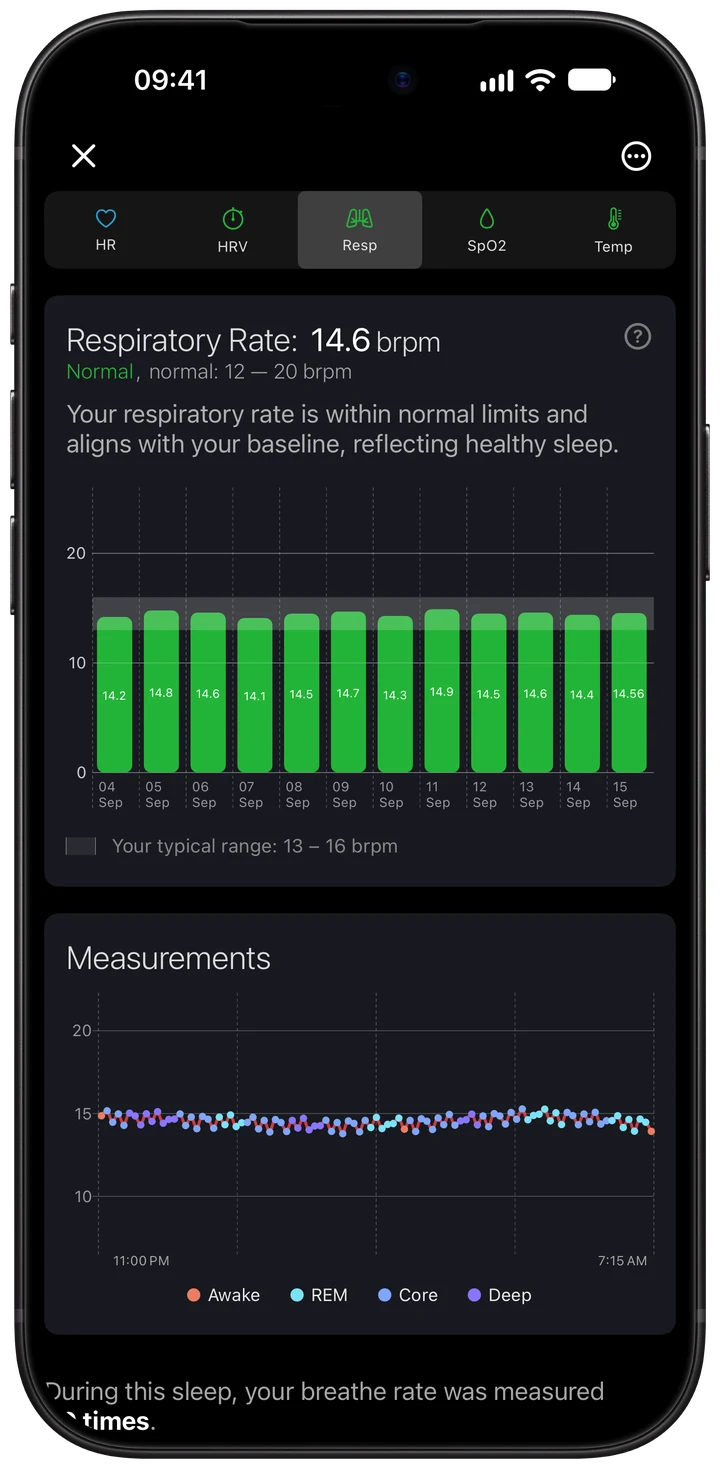
Respiratory rate is the number of breaths per minute recorded during sleep. Wellhero shows the night's average, a comparison with recent nights and the available readings across the sleep period.
Use the average to compare nights, then inspect the individual points if the result differs from your usual pattern. Gaps show where readings are unavailable; they do not indicate that breathing stopped.
The app's reference bands and your recent range provide context for the chart. They do not identify the cause of a change or diagnose a breathing condition.
Blood oxygen: SpO₂
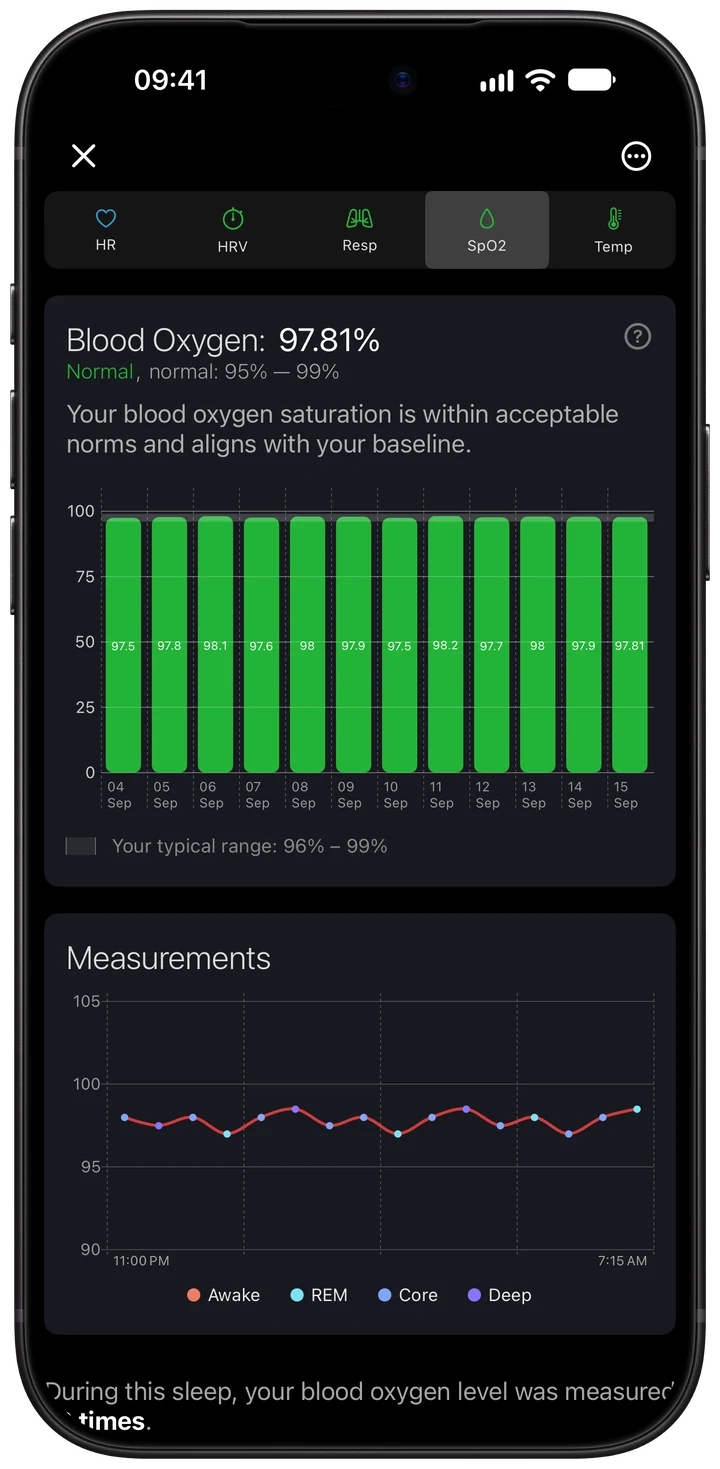
The blood oxygen tab shows SpO₂ readings available during the sleep period as a percentage, together with the nightly average and recent history.
Blood oxygen availability depends on your device, region, settings and permissions. Wellhero can only show values that were recorded and made available through Apple Health.
Check the individual readings and their coverage before interpreting a nightly average. An isolated low reading does not by itself establish a sleep disorder, and a night without readings should not be read as a normal result.
Sleeping wrist temperature
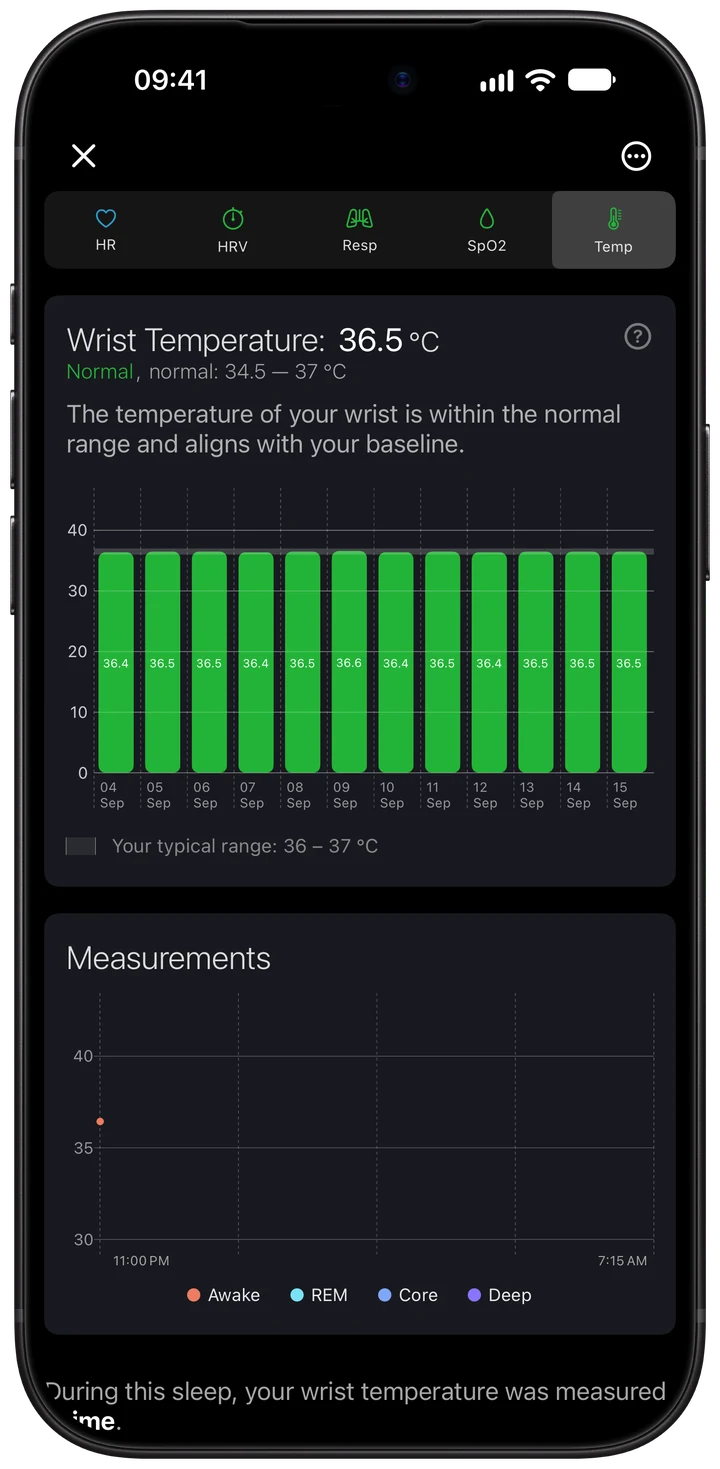
On supported devices, Wellhero displays the sleeping wrist temperature recorded in Apple Health. The tab shows the nightly average, recent history and the readings available for the night.
Temperature is shown in your selected Celsius or Fahrenheit unit. Compare like-for-like nights and use your own recent range as context. Wrist temperature is a peripheral measurement, rather than a measurement of core body temperature.
Not every watch supplies this data. Missing temperature readings can reflect device support, recording conditions or permissions; the report cannot fill in those gaps.
Which sleep features need Wellhero Pro?
The report provides the sleep summary, duration chart and stage breakdown without Pro. Pro unlocks schedule analysis, detailed REM and deep sleep percentages and history, sleep debt, and detailed overnight HRV, respiratory rate and temperature charts. The heart rate and blood oxygen charts remain available without Pro when their source data is present.
A subscription unlocks analysis; it does not add sensors to your watch or create missing Apple Health measurements.
Questions about sleep tracking
Why does Wellhero show a different sleep score from another app?
Apps can use different scoring rules and choose different sleep records. Wellhero combines duration, stages, awake periods, wake-ups and heart rate. Compare the underlying measurements and the selected night, as well as the headline score.
Why are some overnight vital tabs empty?
Sleep stages and vital signs come from separate records. A watch may record sleep while a particular vital has no readings. Check device support, permissions and Apple Health data, then allow the watch to sync.
Does Wellhero record sleep itself?
Wellhero analyzes sleep and health measurements available through Apple Health. Your Apple Watch or another compatible source must record the underlying sleep data.
How should I read the chart colors?
Colors in the overnight point charts identify sleep stages. History charts can also show the app's reference ranges and your recent usual range. Read the legend and units before comparing values across tabs.
Can the sleep report diagnose a medical condition?
No. The report helps you review wearable data and patterns. Sleep quality, stage estimates and overnight vital readings are not diagnostic results.
Open your next night's sleep report
Connect Apple Health, wear your watch overnight and open the sleep card after the data syncs. Start with the summary, then use the charts to understand the duration, timing, stages and readings behind it.
Download Wellhero on the App StoreContinue with recovery tracking or explore all Wellhero features.